

Can the iPhone Camera app show a script while you record?
No. The Camera app has no place for text. On iOS 18 and later it has a Pause button while you record, so you can say a few lines, pause and read the next ones, but you look away from the lens every time. Apple's steps: Apple Support, Record a video with your iPhone camera. A teleprompter app covers what the Camera app cannot: it shows the script on the same screen that films you.
How do you use a teleprompter app on iPhone?
These steps use Cue.
- Tap + (New script) on Scripts, then type or paste your script. Cue saves it as you type.
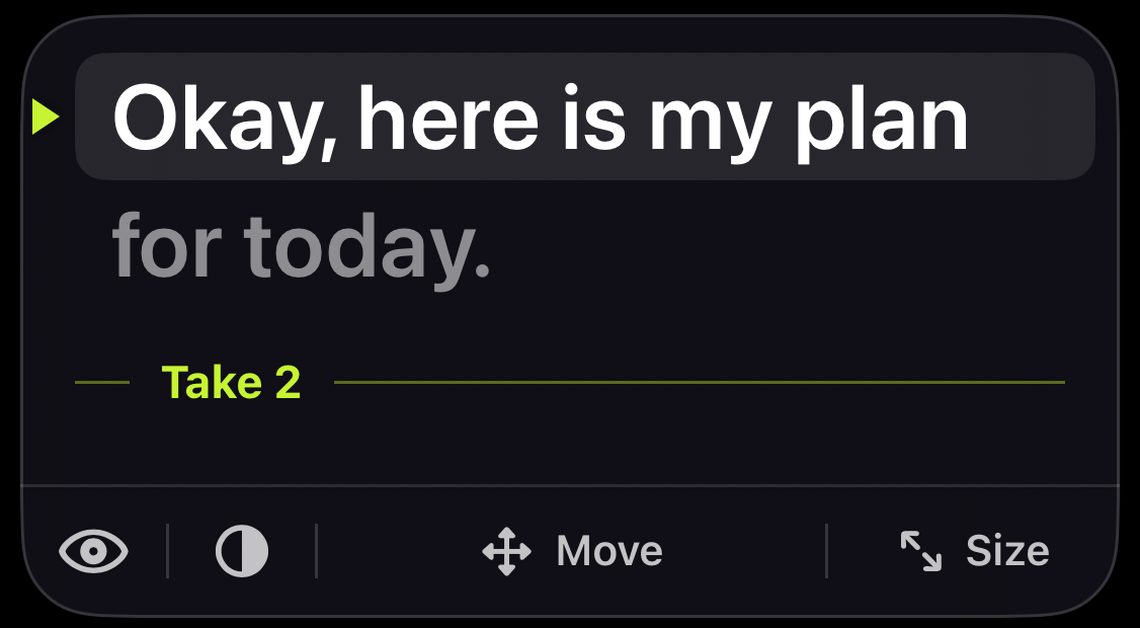
- Tap Open Teleprompter. The first time, tap Allow camera and microphone. The camera opens on the front camera, with the script on a card at the top of the screen.
- Drag the Move bar under the card until the first line sits just below the camera lens.
- Drag the Size rail on the right edge until each line holds only a few words.
- Drag the Speed rail on the left edge to your talking pace. Before you record, tap the script to start and stop it, and rehearse.
- Tap the record button. After the Countdown (3 seconds unless you change it in Timer and remote), the script starts scrolling. You can still change Speed while you film. Tap the record button again to stop.
- Review opens. Tap Save to put the video in Photos, then Share.
If the phone is on a tripod, turn on Volume remote in Timer and remote. A volume button or a Bluetooth shutter then starts and stops each take.
What should you look for in an iPhone teleprompter?
- Text close to the lens, not in the middle of the screen
- Speed you can change while you film
- Mirror, if you use a beam-splitter rig
- Recording built in, so you are not switching between two apps
- A way to film a long script in parts
How do you film a long script on iPhone?
One slip in a long recording means keeping it or starting over. With Cue Pro you can film in takes: put a take break wherever a part ends, record one part at a time while the script waits, redo only the part you did not like, and combine every take into one video. Cue also has a guide on eye contact for reading without looking like you are reading.
Questions
Can viewers see the script in my video?
No. The script is on your screen only. The video records what the camera and microphone pick up.
Can I use the back camera?
Yes. Cue opens on the front camera. Tap Flip camera on the Record screen to switch to the back camera.
Do I need a teleprompter rig?
No. The card sits next to the front camera on the iPhone that films you. If you use a beam-splitter rig, open the Mirror tool and turn on Script mirror, so the text reads the right way round in the glass.
Is Cue free?
The teleprompter and camera, 3 scripts, Full HD recording, starter templates and script backup are free. Cue Pro adds unlimited scripts, filming in takes, 4K and importing scripts from Files: Yearly with a 7-day free trial, Monthly, or Lifetime as a one-time purchase. The App Store shows the price for your country.