

How do you pause video recording on iPhone?
The Camera app can pause a recording on iOS 18 and later. Apple's steps: Apple Support, Record a video with your iPhone camera.
- Open Camera and tap Video.
- Tap the Record button, or press either volume button, to start recording.
- Tap the Pause button to pause recording.
- Stop the same way you started. The video is saved in Photos.
Pause gives you a breather inside one video. There is no script on screen, a part cannot be redone by itself, and a stumble stays in the video.
What does filming in takes mean?
You split the script into parts, and each part is a take. You record take one, and the script stops at the next break. Fix your hair, move the camera, breathe, then record take two. When you finish, Cue combines every take into one video and saves it to Photos. Filming in takes is part of Cue Pro.
How do you film a video in takes with Cue?
- Open your script, put the cursor where a part ends and tap New take. A Take 2 divider appears with its read time. Add one wherever another part ends.
- Tap Open Teleprompter and record take one. The script stops at the next break and waits for you.
- Tap record for each following take. The strip of take chips on the Record screen shows what you have so far.
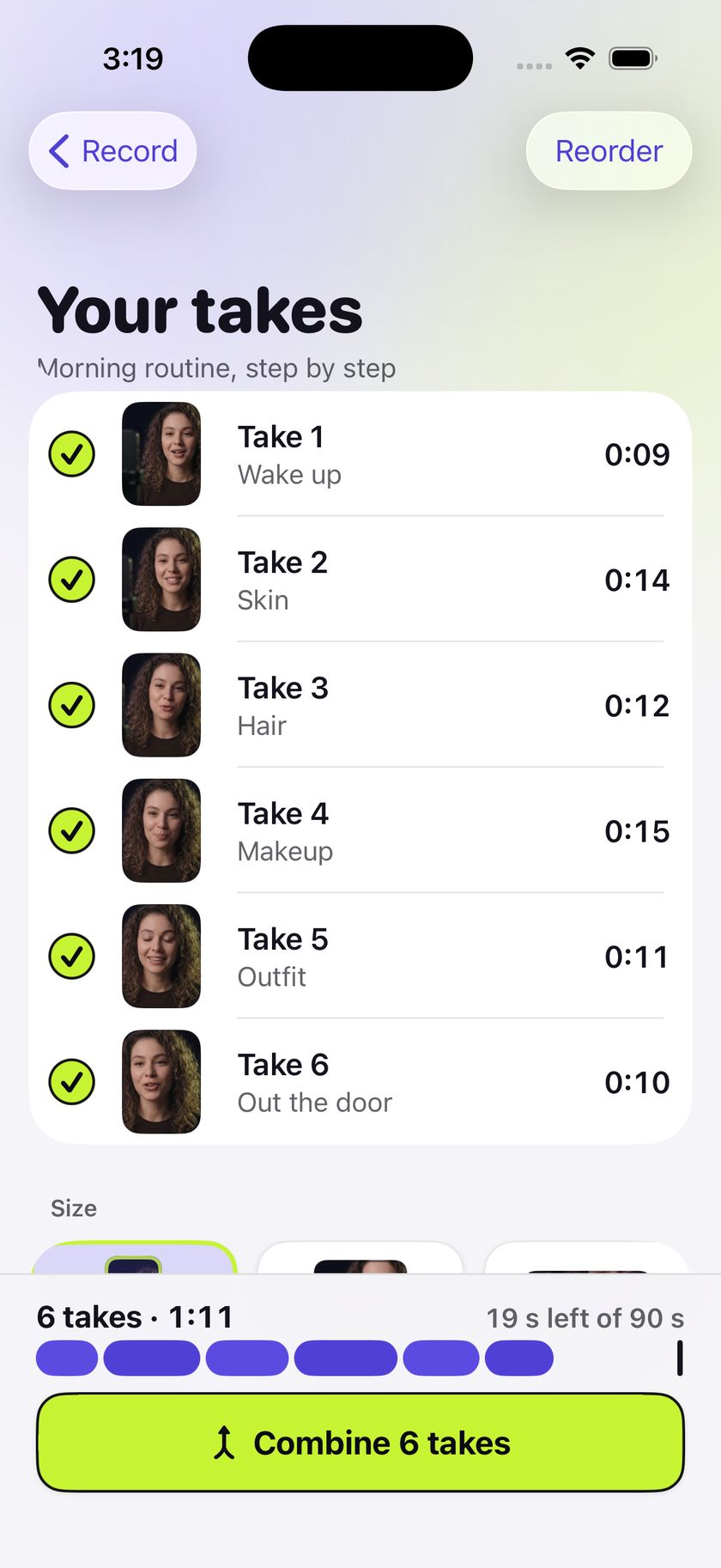
- Tap Finish. On Your takes, tap Reorder at the top right, drag the takes into order, then tap Done. To leave a take out of the video, tap the check circle beside it so it reads Left out. Tap it again to put it back.
- Tap Combine N takes. Cue saves one video to Photos and opens the Saved screen, where Share is the main button.
How do you redo just one part?
Tap that take in the strip of take chips on the Record screen, then tap Re-record. Cue says "Your next recording replaces this take", and the other takes stay as they are. The same screen has Trim and Delete for a single take.
What can you change when you combine?
Size sets the shape of the video: 9:16 Vertical, 1:1 Square or 16:9 Wide. The square and wide sizes keep the middle of each take and cut the top and bottom. Length guide marks 30, 60 or 90 seconds and shows how far over or under you are. Combining needs about twice the combined size of the takes free on the iPhone to start.
Reading a script while you film? See how to use a teleprompter on iPhone.
Questions
How do you pause video recording on iPhone?
Open Camera, tap Video, tap the Record button or press a volume button to start, then tap the Pause button. This needs iOS 18 or later.
Can I redo just one part of a video?
Not in the Camera app: everything you record stays in one video. In Cue Pro each part is its own take, so you can re-record one take and leave the others as they are.
How many takes can I film in Cue?
There is no limit on the number of takes. Split a short hook into two takes or a long tutorial into twenty.
Is filming in takes free?
No, it is part of Cue Pro, which comes as Yearly with a 7-day free trial, Monthly, or Lifetime as a one-time purchase (the App Store shows the price for your country). The teleprompter, camera, 3 scripts and Full HD recording stay free.